The BMW design team approached the interior of the 545i with no less enthusiasm and edgy-creativity than was exercised outside,
 |
| While the BMW design team put considerable enthusiasm and creativity into the interior, the updated yet still complicated iDrive remains. (Photo: Rob Rothwell, Canadian Auto Press) |
and while BMW has always been recognized for building stylish, upscale interiors, this year they may have gone too far. Why? iDrive, that's why. Some have claimed that iDrive really means; "I drive, you change the radio settings." It's just that complicated. Now, I understand BMW's concept of clearing away dashboard clutter by placing many non-essential controls under the command of a console-mounted multi-function dial, but for those of us not working in NASA's IT department, iDrive can drive you nuts - at least initially. After scanning some accompanying literature and sequestering myself away to concentrate on practicing with the iDrive dial, I became fairly conversant with its use, although not sufficiently so to do anything second nature. Fortunately BMW retained some of the basics outside the scope of the whiz-kid gizmo in its second generation - yes the first one was even more complicated. I was relieved to find shortcut buttons surrounding the mouse-like dial, plus audio controls mounted on the three-spoke steering wheel and HVAC controls where they should be - on the dash.
BMW claims the iDrive system allows the driver to concentrate fully on driving because the system provides distraction-free access to secondary control functions; hmmmm...
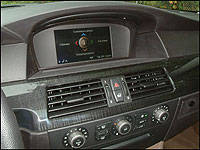 |
| For 2005 the iDrive format has been simplified over the already "simplified" 2004 version. (Photo: Rob Rothwell, Canadian Auto Press) |
I'm skeptical. A dash-mounted 8.8-inch screen displays iDrive data. Operational categories are chosen by tilting the iDrive dial in the direction of the desired category displayed on the screen. Pushing down on the highlighted selection opens an options screen, which enables the activation of specific functions. After choosing the intended function, settings can be adjusted by rotating the iDrive dial and clicking on this or that, depending on what has been highlighted on the screen. Are you with me so far? Unless equipped with the optional navigation system, the four basic categories of operation accessible through iDrive are climate, entertainment, communications and car data. Blissfully I can report that for 2005 the iDrive format has been simplified over the already "simplified" 2004 version, requiring fewer key strikes if you will, to complete desired adjustments.